Welcome
Get started with SyncGaze
SyncGaze is one account for your business email and workspace: mail, contacts and forms, all under your own domain. This guide takes you from signing up to sending your first message.
Which one are you?
Pick the path that matches what you need. You can always add more later.
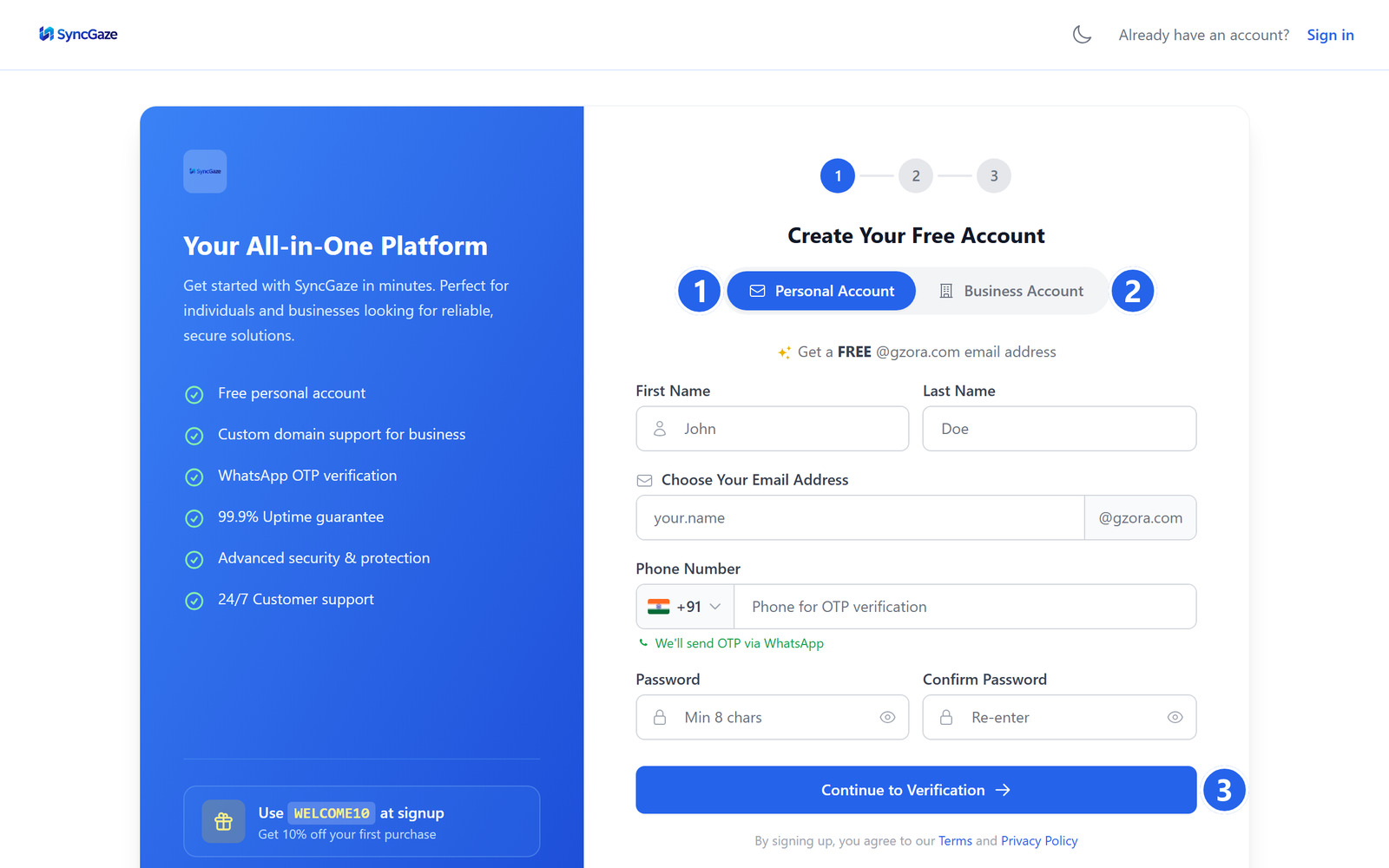
- Go to
https://auth.syncgaze.in/signup. - Choose Personal Account for a free
@gzora.comaddress, or Business Account for email on your own domain. - Fill in the form and click Continue. The guides below walk through every step.
Screenshot coming soon
screens/gs-signup-choose.png
The sign-up page.
- 1Personal Account: a free address on
@gzora.com; no payment, no domain. - 2Business Account: email at your own domain for you and your team.
- 3Continue to Verification: sends a 6-digit code to your WhatsApp to confirm your number. For a business account the button leads to plan selection first.
A personal free mailbox
A free @gzora.com address for yourself. Sign up with your phone in about two minutes, no payment, no domain.
Email for my business
Email at your own domain: you@yourcompany.com: for you and your team. Pick a plan, add your domain, and create mailboxes.
One login, every appWhen you sign in to SyncGaze, you're signed in to Mail, Contacts and Forms at the same time, no separate logins to remember.
Ready to start?